Multi-format ingestion
PDF, scans, photos, email attachments and structured uploads — from any inbox or portal.

Invoices, contracts, claim forms, purchase orders, applications. AI extracts the fields, classifies the document, validates against your rules and only escalates the genuine exceptions to a human.
Operations, finance and administrative teams spend hours every day moving documents around. Someone opens an inbox, reads an invoice, types fields into a system, decides who should approve it and forwards it on. Multiply that by thousands of documents a week and you have a hidden cost centre nobody put on a slide.
Traditional OCR captures text but doesn't understand it. Rules engines break the moment a supplier changes their template. The work quietly piles up.
We build production AI that ingests documents from email, SFTP, portals or scanning, classifies them by type, extracts the right fields with a confidence score and routes them into the correct downstream workflow — finance approval, contract review, claim adjudication, application onboarding.
Confident decisions are processed straight through. Anything ambiguous — missing signature, duplicate, mismatched supplier, unusual amount — lands in a human review queue with the document, the extraction and the reason for escalation already attached.
The goal isn't to remove humans from document work. It's to remove humans from the repetitive 90% so they can focus on the 10% that actually needs judgement.
How an incoming document flows through the platform — processed straight through when confidence is high, or escalated cleanly when it isn't.
Document arrives
Email, SFTP, portal upload or scanner
Classification
Invoice, contract, claim, PO, application …
Field extraction
Supplier, amount, dates, references, line items
Validation
Cross-check against suppliers, POs and policy rules
Routing decision
Approval queue, ERP, CRM or downstream workflow
Exception review
Humans handle ambiguity, audit trail captured
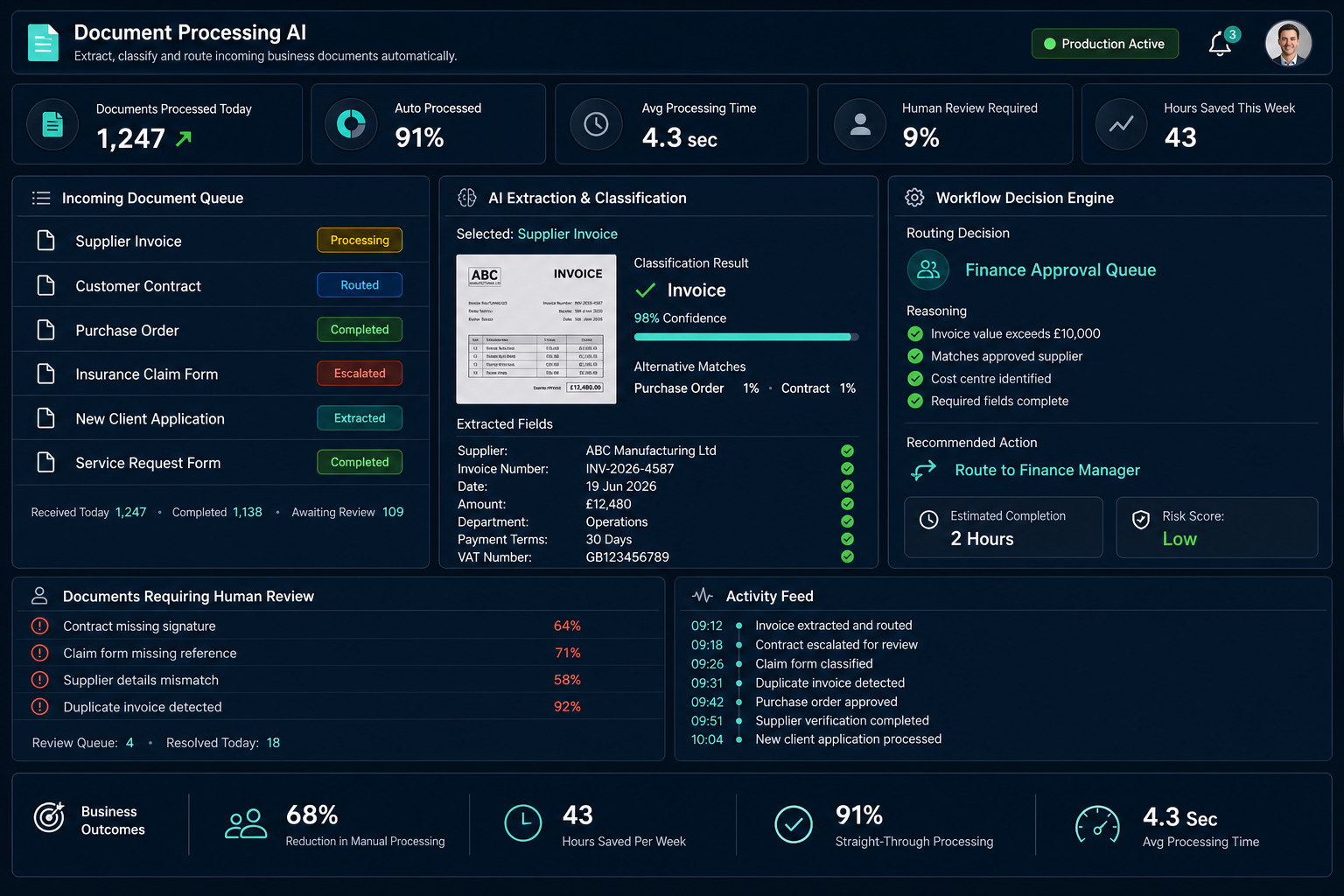
What a production-grade document processing platform looks like once it's running alongside your operations, finance and administrative teams.
PDF, scans, photos, email attachments and structured uploads — from any inbox or portal.
Recognises document type with a transparent confidence score and alternative matches.
Suppliers, amounts, dates, line items and references — with per-field confidence indicators.
Policy checks, duplicate detection, supplier matching and threshold-based escalation.
Documents land in the right queue or system — finance approval, ERP, CRM or case management.
Straight-through rate, exception trends and full per-document audit trails for compliance.
Same volume of incoming documents. A very different shape of the operations team's day.
Most documents process themselves. Exceptions become the work — not the queue. Operations and finance teams reclaim hours every week, and the audit trail is cleaner than anything a manual process produced.
Documents handled in seconds rather than days of inbox time.
Routine documents flow without human touch — typically 80–95%.
Teams focus on judgement calls and exceptions, not data entry.
Every decision, extraction and override captured for review.
A 30-minute call. No pitch deck. If we can help, we'll tell you how. If we can't, we'll point you somewhere that can.